
1. Black text and thin lines
Use pure single black (C0, M0, Y0, K100).
Ideally, four-color black can be perfectly aligned. In actual printing, registration deviation is unavoidable. Offset exceeding 0.1mm will be visible to the naked eye and cause ghosting.
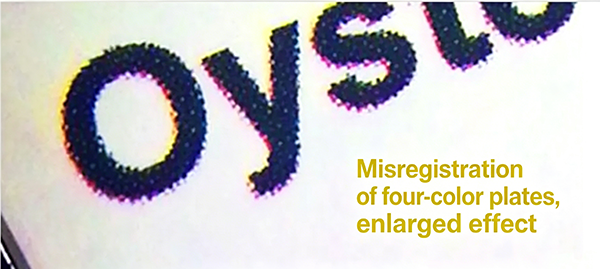
2. Large-area black
Recommended formula: four-color black (C75, M68, Y67, K90).
Single black applied over large areas looks gray due to insufficient ink volume and thin ink layer.
Blending other colors deepens black tone. Dual-color black and composite black alternatives are also applicable.
Three common black tones: True Black, Cool Black, Warm Black
① True Black: C75, M68, Y67, K90
The total CMYK ink density of four-color black shall not exceed 250.
A deviation within 7% from standard true black delivers solid black with invisible visual difference.
Four-color black: C60, M40, Y40, K100
True Black: C75, M68, Y67, K90
Different color values show identical visual effect.
② Cool & Warm Black
Cool Black: Black mixed with 30% Cyan
Warm Black: Black mixed with 30% Magenta
3. Spot color verification
Mark spot colors clearly for designs dominated by one or two hues.
PANTONE color cards are widely adopted, including glossy C-coated cards and matte U-coated cards.
Match and confirm color numbers with physical PANTONE cards for later adjustment communication with printing factories.
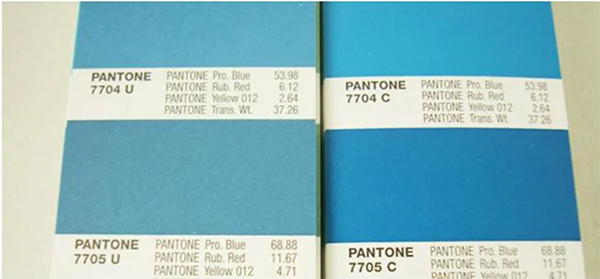
4. Process marking
Color effect coordinates with printing techniques. Mark colors together with corresponding processes.
(1) Product information marking
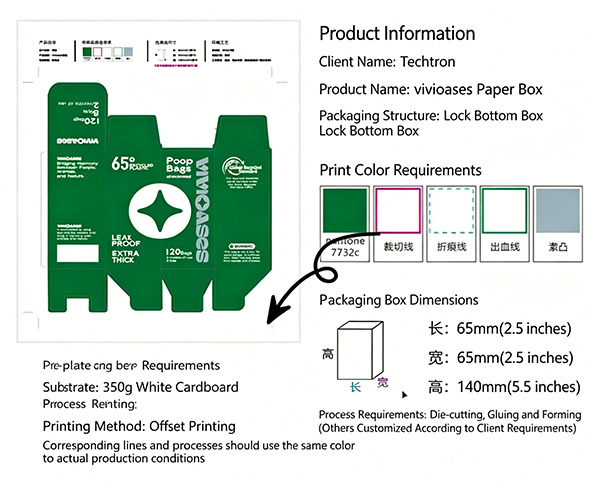
(2)Printing color marking
• Spot color: Clearly indicate PANTONE color number
• CMYK: Specify four-color values to avoid chromatic aberration
Operational Steps (Blue packaging example)

1. Locate the target blue on physical color card and record its PANTONE number.
2. Navigate: Window — Swatch Libraries — Color Books — PANTONE Solid Coated
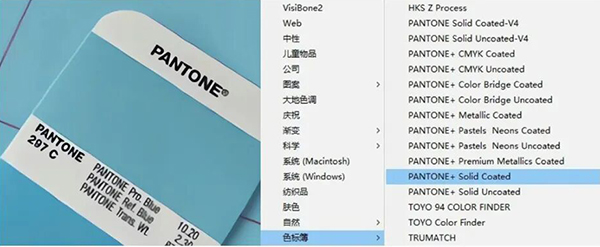
3. Enter number 297 in the pop-up swatch panel to match the physical color.
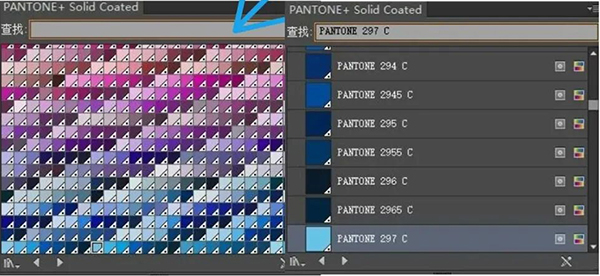
4. Select target areas in the file and apply the matched PANTONE color.
5. Label the confirmed color number in the document: Pantone 297C